This functionality requires certain permission in our TeleVoIPs Portal. If you are unable to complete the steps detailed below, please contact our support team @ 813-655-5100 Op.2 OR email us support@televoips.com
Ordering a DID in the TeleVoIPs Portal:
1. Log into the TeleVoIPs Portal 2. Select Numbers and Number Search 3. Choose Local or Toll Free 4. Enter the desired area code (Ex 813) * Optional: Enter the desired vanity numbers 5. Check the boxes to select a number(s) to order 6. Click 'Order' and confirm. | 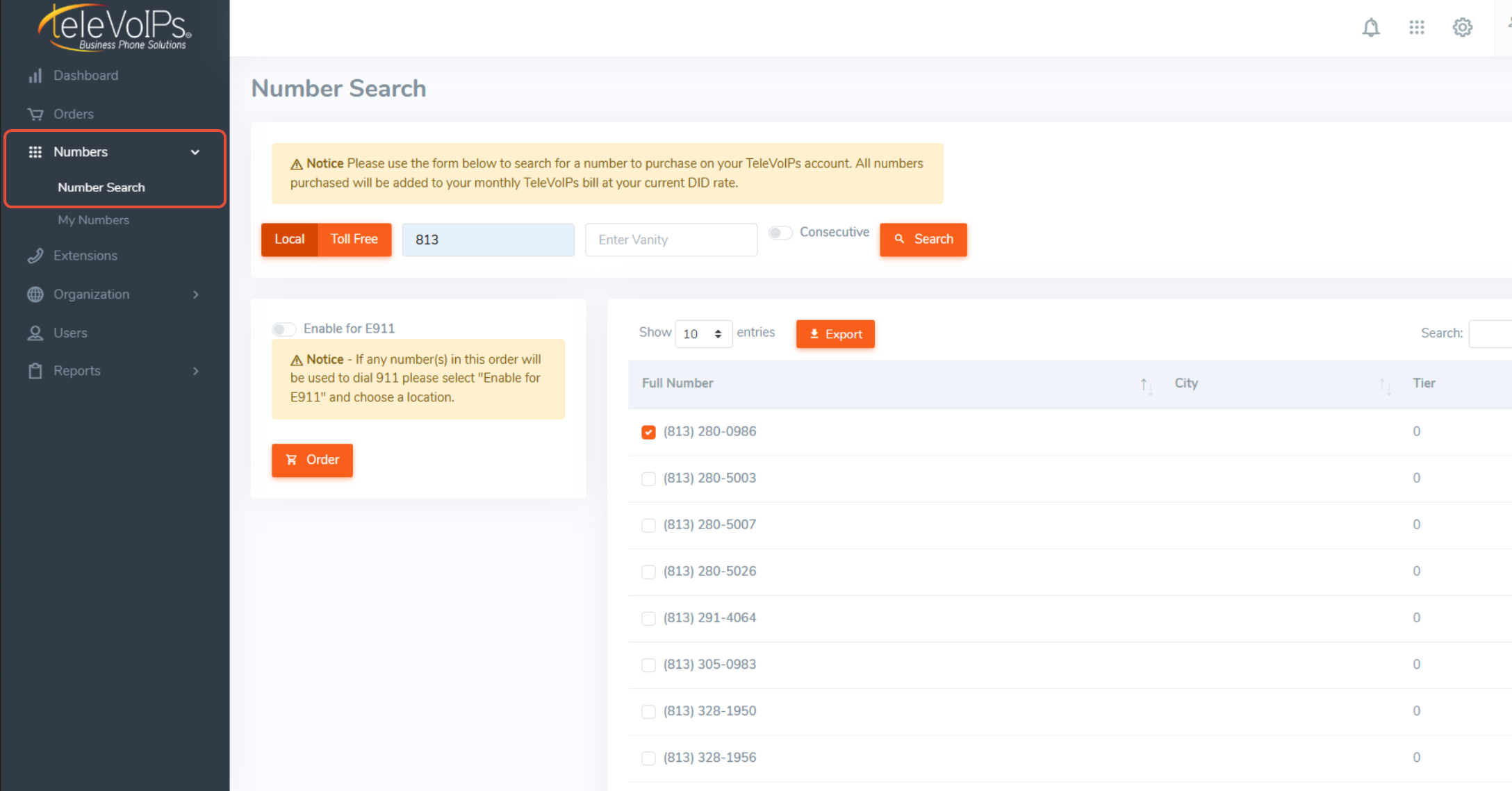 |
Our portal will then process the order and provide you confirmation its been completed or failed. Once confirmed, the number will be in the Inventory page of the Manager Portal as an available number.
Was this article helpful?
That’s Great!
Thank you for your feedback
Sorry! We couldn't be helpful
Thank you for your feedback
Feedback sent
We appreciate your effort and will try to fix the article