USERS 
The Users tab is where you can add, remove, and edit users/extensions. Use the search bar to find a user by name or extension number. You can change the name, email, and e911 information under ‘Profile’, seen below. You can also reset their voicemail PIN.
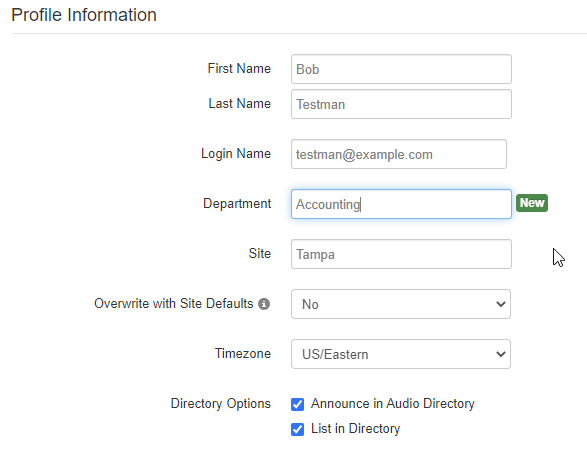
For further documentation on how to create a new user, click here: Creating a Basic User
Updating Users:
- Voicemail – Under the Voicemail tab, you can manage messages and greetings, as well as update a user’s voicemail-to-email settings.
- Answering Rules – Answering Rules let you control which devices ring, for how long, and what happens if the call is not answered.
- Advanced – In this tab, you can reset a user and send emails to initiate password resets.
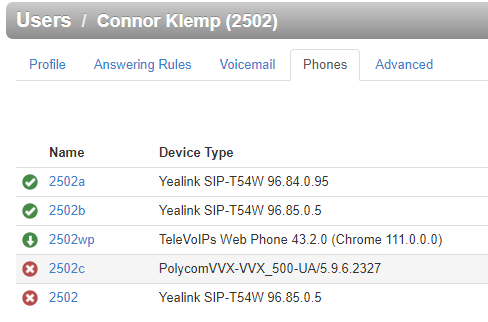
Phones – Here you can add, view, and manage a user’s hard or soft phones. Registered devices are indicated by a green or red circle next to the name or extension.
Click Edit on a device to update its e911 address, assigned MAC, or call recording status (if applicable).
Click Phone Builder to access the hardware inventory
NOTE: As an office manager, you can also change a user’s emergency caller ID. Traditionally, A phone number is assigned a specific address, however, we can create a validated address entry for any remote users that you can select as their emergency address.
⚠️ Important: This ensures their local 911 dispatch is contacted with the correct information, if an emergency arises.
Was this article helpful?
That’s Great!
Thank you for your feedback
Sorry! We couldn't be helpful
Thank you for your feedback
Feedback sent
We appreciate your effort and will try to fix the article