Adding an Agent to an Existing Call Queues
- From the Manager portal navigate to the Call Queues page.
- Click the edit agents option (person icon) next to the desired queue
- Select Add Agent
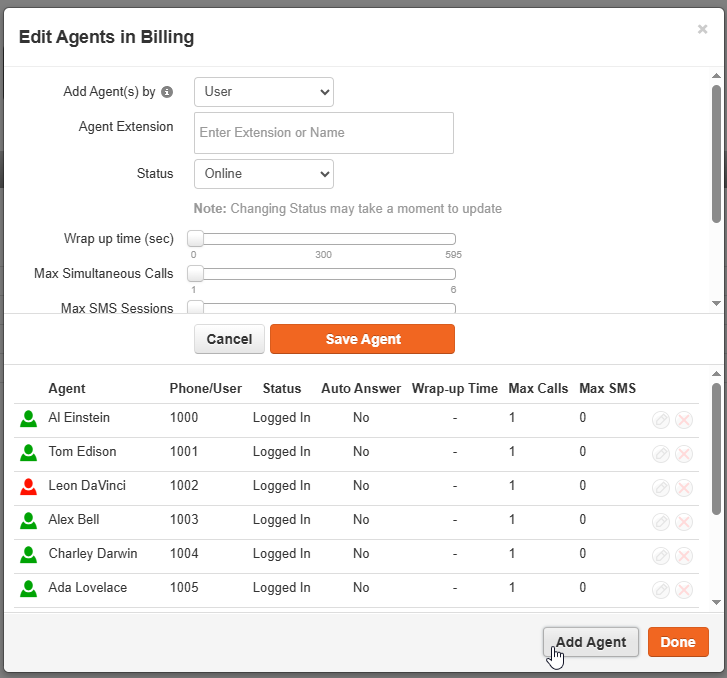
- Enter the extension of the desired agent (multiple extensions can be entered in this field)
- Click Save Agent
- Click Done
Setting a Queue Failover
- From the Call Queues page, select Edit (pencil Icon) next to the desired queue
- Select In Queue Options
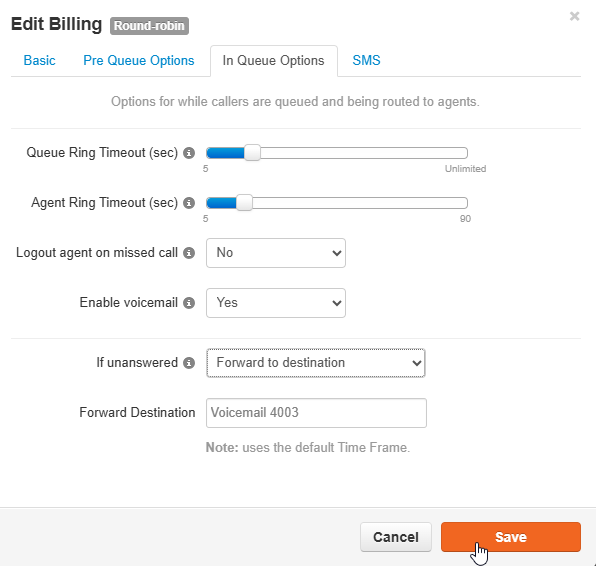
- In the If Unanswered queue, select forward to destination
Enter the desired extension or select a voicemail if applicable.
- Click Save
Editing Queue Timing
- From the Call Queues page, select Edit (pencil Icon) next to the desired queue
- Select In Queue Options
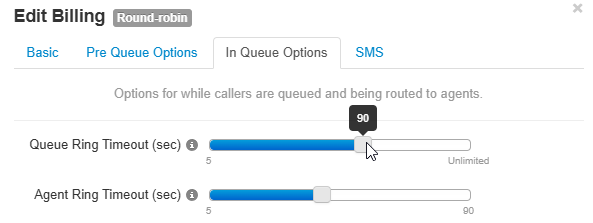
- Adjust:
Queue Ring Timeout – Total time the queue will ring.
Agent Ring Timeout – Time each individual agent’s phone will ring (should be less than the Queue Ring Timeout).
- Click Save
Was this article helpful?
That’s Great!
Thank you for your feedback
Sorry! We couldn't be helpful
Thank you for your feedback
Feedback sent
We appreciate your effort and will try to fix the article